You open a blank document, type a working title, and then stop before writing the first paragraph.
Should this blog post be 700 words? Maybe 1,500? Would 2,000 words perform better? Or would that simply make the article longer than it needs to be?
This is a common question for bloggers, students, freelancers, business owners, and anyone creating content for a website. Word count is useful because it gives you a rough idea of how much space you have to explain a topic. However, there is no single number that works for every article.
A simple definition may only need a few hundred words. A practical tutorial could require 1,200 words. A detailed guide covering several related questions may naturally grow beyond 2,000 words.
The better question is not simply, “How long should my blog post be?” It is, “How much useful information does the reader need for this particular topic?”
Is There an Ideal Blog Post Length?
There is no universal ideal blog post length.
The appropriate length depends on what the reader is trying to accomplish, how complicated the subject is, and how much explanation is genuinely necessary.
For example, someone searching for the meaning of a simple term probably does not want to read a 3,000-word guide. They may only need a clear definition, an example, and a few related details.
Someone searching for a complete beginner's guide to starting a blog may need much more. That article could reasonably include setup steps, platform choices, writing advice, publishing tips, and common mistakes.
Several factors usually influence article word count:
Search intent
Topic depth
Audience knowledge
Article purpose
Number of questions being answered
Level of competition
Examples or instructions required
Overall content quality
Word count should therefore be treated as a planning tool rather than a strict rule.
Why Blog Post Length Matters
Although a specific number does not guarantee a better article, thinking about length can improve the writing process.
It helps with planning
A rough word-count target can make outlining easier.
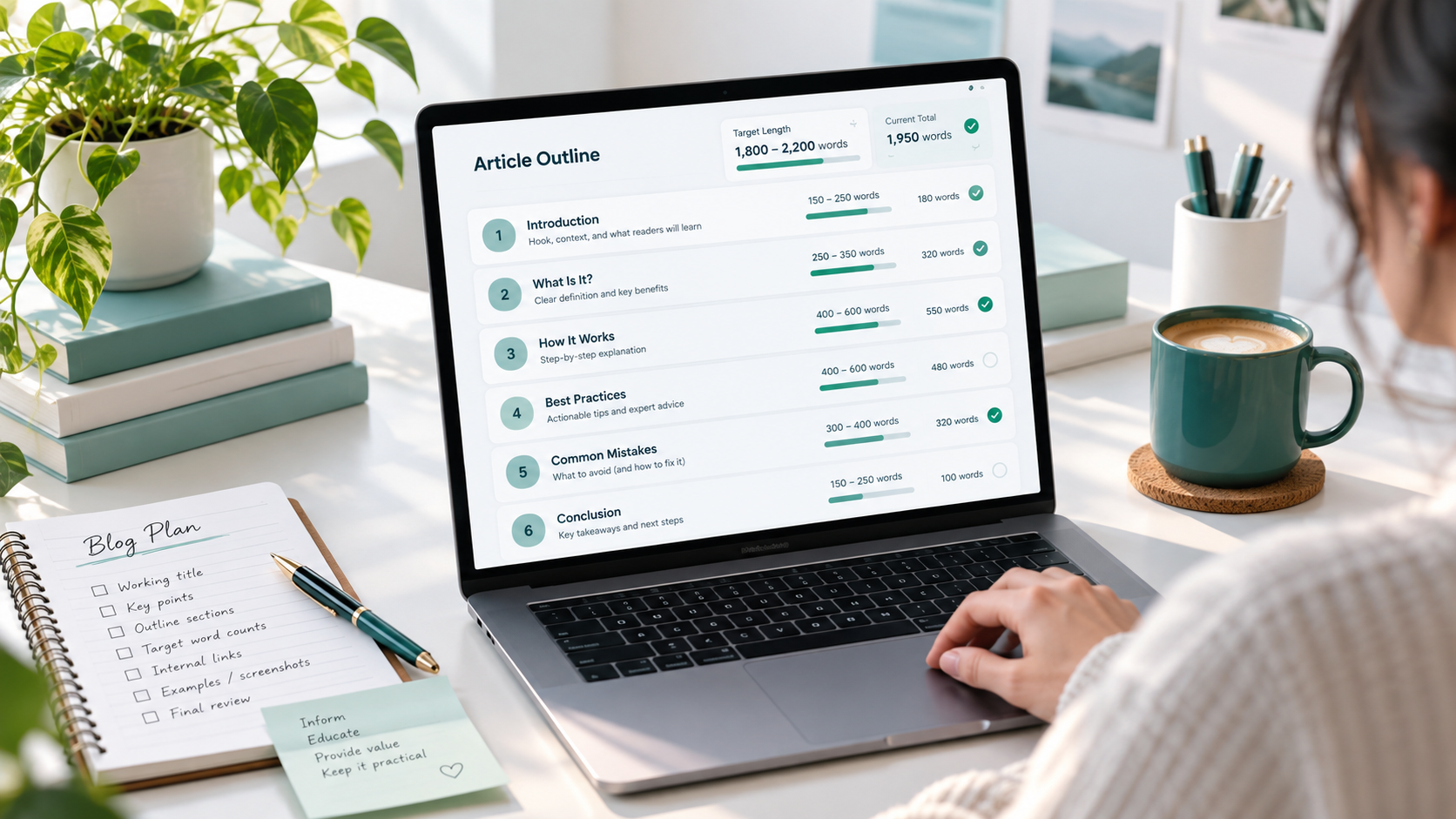
If you expect an article to be around 1,500 words, you can divide that space between the introduction, major sections, examples, and FAQs instead of allowing one part of the article to become unnecessarily long.
It encourages appropriate depth
Some subjects need more explanation than others.
A longer article gives you room to answer additional questions, explain difficult concepts, show examples, and cover common problems. A short article may be better when the topic is narrow and straightforward.
It improves editing decisions
Checking article word count can help reveal whether a draft has become too repetitive or too thin.
If a simple topic has grown to 2,500 words, you may discover sections that can be trimmed. If a detailed guide is only 400 words, you may notice important questions that were never answered.
It can improve readability
Length also affects how an article should be structured.
As an article becomes longer, headings, short paragraphs, lists, examples, and clear transitions become increasingly important. Readers should be able to scan the page and quickly find the information they need.
Short Blog Posts: When They Work Best
Short blog posts are useful when the reader needs a quick and focused answer.
A short article might be roughly 400 to 800 words, although there is no fixed boundary.
This length can work well for:
Simple definitions
Small tutorials
Product or feature announcements
Quick tips
Narrow questions
Basic tool guides
Short troubleshooting articles
Imagine an article explaining how to remove extra spaces from text. The task itself is simple. Readers may only need to understand why unwanted spaces appear, how to remove them, and what to check afterward.
Turning that topic into a very long article could make the answer harder to find rather than more useful.
Short content works best when the topic is genuinely narrow, not when useful information has been removed simply to keep the article small.
Medium-Length Blog Posts: A Practical Balance
Medium-length posts often provide enough space to explain a topic properly without becoming overwhelming.
A practical range might be around 800 to 1,600 words.
This length often suits:
How-to guides
Beginner tutorials
List articles
Comparison posts
Educational explanations
Writing guides
Practical problem-solving content
For example, an article explaining how to write a professional blog post could cover planning, outlining, writing, editing, formatting, and publishing within this range.
Medium-length posts are especially useful when a topic needs more than a quick answer but does not require an extensive reference guide.
They also give writers enough room to use examples and answer common questions naturally.
Long Blog Posts: When More Detail Helps
Longer articles can be valuable when the subject contains many important parts.
A long blog post may be 1,600 to 3,000 words or more, depending on the topic.
Long-form content often makes sense for:
Complete guides
Complex tutorials
Detailed comparisons
Pillar content
Technical explanations
Topics with many related questions
Step-by-step processes with examples
Suppose you are writing a complete guide about building a website. A useful article might need to discuss domains, hosting, website platforms, page structure, mobile design, security, SEO basics, and maintenance.
Trying to fit all of that into 600 words could leave readers with incomplete information.
However, length should come from useful depth, not repetition. A 3,000-word article with 1,000 words of filler is not automatically better than a focused 1,500-word article.
Blog Post Length and SEO
SEO content length is often misunderstood.
Writing more words does not automatically make an article rank higher in search results.
Search engines and readers both benefit from content that answers the query clearly and thoroughly. Sometimes that requires a long article. Sometimes a short page can provide the best answer.
Instead of focusing only on word count, consider whether the article:
Matches the search intent
Answers the main question clearly
Covers important related questions
Uses helpful headings
Avoids unnecessary repetition
Includes useful examples where needed
Links to relevant supporting pages
Is easy to read on mobile and desktop
Provides more value than simply repeating obvious information
A longer article can create more opportunities to explain a subject thoroughly, but adding paragraphs purely to increase SEO content length can reduce quality.
Completeness is more important than size.
If the reader can finish your article feeling that their question has been answered properly, the content has probably reached an appropriate length.
How to Decide the Right Word Count for a Blog Post
Instead of choosing a random number before writing, use a simple decision process.
Understand the search intent
First ask what the person searching for the topic actually wants.
Are they looking for a definition, instructions, a comparison, a list of options, or a complete guide?
A quick-answer search usually needs less content than a detailed research query.
Check what the reader wants to know
Think about the questions someone would naturally ask after reading the title.
For an article about choosing blog post length, readers may want to know:
What length works for SEO?
Are short posts still useful?
When should an article be long?
Does every post need the same word count?
How can writers measure article length?
Those questions help determine how much content the article needs.
List the main questions to answer
Create an outline before drafting.
Each important question can become its own section. This prevents the article from drifting into unrelated topics simply to increase the word count.
Decide how deep the topic needs to be
Some sections need one paragraph. Others may need examples, steps, or comparisons.
Give important topics the space they deserve instead of trying to make every section the same size.
Remove filler
After writing, look for repeated ideas, unnecessary introductions, overly long examples, and sentences that do not help the reader.
If removing a paragraph makes the article clearer without losing useful information, that paragraph probably was not necessary.
Check the final word count before publishing
Once editing is complete, check the total article word count.
The final number can help you understand your writing style and compare similar articles, but it should not override usefulness.
Check Blog Post Word Count with ToolNest
When writing or editing an article, checking the word count can help you understand whether the draft is developing as planned.
You can use the ToolNest Word Counter to quickly measure the number of words in your text.
Free Tool
Word Counter
Count words, characters, sentences, and paragraphs.
A word counter can be especially helpful while trimming a long draft, expanding a thin section, or checking whether an article roughly matches your planned structure.
When using any unfamiliar online text tool, avoid pasting confidential client documents, passwords, private records, unpublished business information, or sensitive personal data unless you fully understand how that service handles submitted information.
Word Count vs Character Count in Blog Writing
Word count and character count measure different things.
Word count tells you how many words appear in the article. This is usually the more useful measurement when planning blog content because writers often think in terms of paragraphs, sections, and overall article depth.
Character count measures letters, spaces, punctuation marks, and other individual characters.
Character limits are often more important for:
Page titles
Meta descriptions
Social media captions
Form fields
Short descriptions
Usernames or profile fields
For example, a full article may be planned around a word-count range, while its meta description may need closer attention to character length.
You can read more about the distinction here:
Common Mistakes When Choosing Blog Post Length
Choosing article length becomes easier when you avoid a few common mistakes.
Thinking longer always means better
A longer article is only better when the additional content is useful.
Adding five extra sections that do not help the reader may make the page worse.
Writing filler to reach a target number
Writers sometimes decide that an article must reach 1,500 or 2,000 words and then add repetitive explanations to reach that number.
A target should guide planning, not force unnecessary content.
Making every post the same length
Different topics require different amounts of explanation.
A website may reasonably contain a 600-word quick guide, a 1,200-word tutorial, and a 2,500-word comprehensive resource.
Consistency in quality matters more than consistency in article size.
Ignoring search intent
An article can be detailed and well written while still failing to satisfy the reader if it answers the wrong question.
Always determine what the searcher expects before deciding how much to write.
Copying competitor length without improving usefulness
Looking at competing pages can help you understand the level of detail commonly available, but copying their approximate word count is not a content strategy.
Your goal should be to answer the topic clearly, accurately, and efficiently.
Cutting useful details just to stay short
Over-editing can be a problem too.
If an example, warning, instruction, or explanation genuinely helps the reader, do not remove it merely because the article has passed an arbitrary word target.
Ignoring readability and structure
A 2,000-word article can feel easy to read when it has good headings and short paragraphs.
A 700-word article can feel difficult if it appears as one large block of text.
Structure matters almost as much as length.
Practical Tips for Better Blog Post Length
Start with an outline rather than a word target whenever possible. List the questions the article must answer and arrange them in a logical order.
Give more space to the most important sections. A key tutorial step may deserve several paragraphs, while a simple definition may only need two sentences.
Write the first draft without constantly checking the counter. Watching the number after every paragraph can distract you from explaining the subject naturally.
Check the word count during editing instead. At that stage, the number becomes more useful because you can see whether the article is unnecessarily long or surprisingly short.
Remove repetition aggressively. If two paragraphs explain nearly the same thing, combine them.
Expand sections only when something useful is missing. Good reasons to add content include answering another relevant question, clarifying a confusing step, adding an example, or explaining an important limitation.
Break long posts into clear sections. Headings, lists, short paragraphs, and descriptive subheadings help readers navigate detailed content.
Finally, read the article from the reader's perspective. If the answer feels complete without feeling stretched, the length is probably appropriate.
FAQs
How many words should a blog post have for SEO?
There is no fixed word count required for SEO. The article should be long enough to satisfy the search intent and cover the topic properly without unnecessary filler.
Is 500 words enough for a blog post?
Yes, for some topics. A focused definition, quick tutorial, update, or narrow question may be answered effectively in around 500 words. More complex topics usually need additional depth.
Is 1,500 words a good blog post length?
Around 1,500 words can be a practical length for many guides and educational articles because it allows room for examples and multiple sections. However, it is not a requirement.
Are long blog posts better than short blog posts?
Neither is automatically better. Short posts work well for simple questions, while long posts are useful when the topic genuinely requires more detail.
Should every blog post have the same word count?
No. Article length should change according to the subject, audience, purpose, and search intent.
Can a blog post be too long?
Yes. An article can become too long when it repeats ideas, includes unrelated sections, or makes readers work unnecessarily hard to find the answer.
How do I know when my blog post is finished?
A useful stopping point is when the article has answered the main question, covered the important supporting questions, provided necessary examples or instructions, and contains no obvious filler.
Should I check word count while writing?
You can, but checking constantly is usually unnecessary. Many writers find it more helpful to focus on the draft first and review the final word count during editing.
Final Thoughts
There is no magic number that every blog post should reach.
A simple article may work perfectly at 600 words, while a detailed tutorial may need 1,500 or 2,500 words to answer the reader properly.
Use word count to plan your content, identify articles that are unusually thin or repetitive, and keep your writing organized. But do not let a target number decide what stays in the article.
The strongest blog post is usually the one that gives readers the information they came for, explains it clearly, and stops when the job is done.