
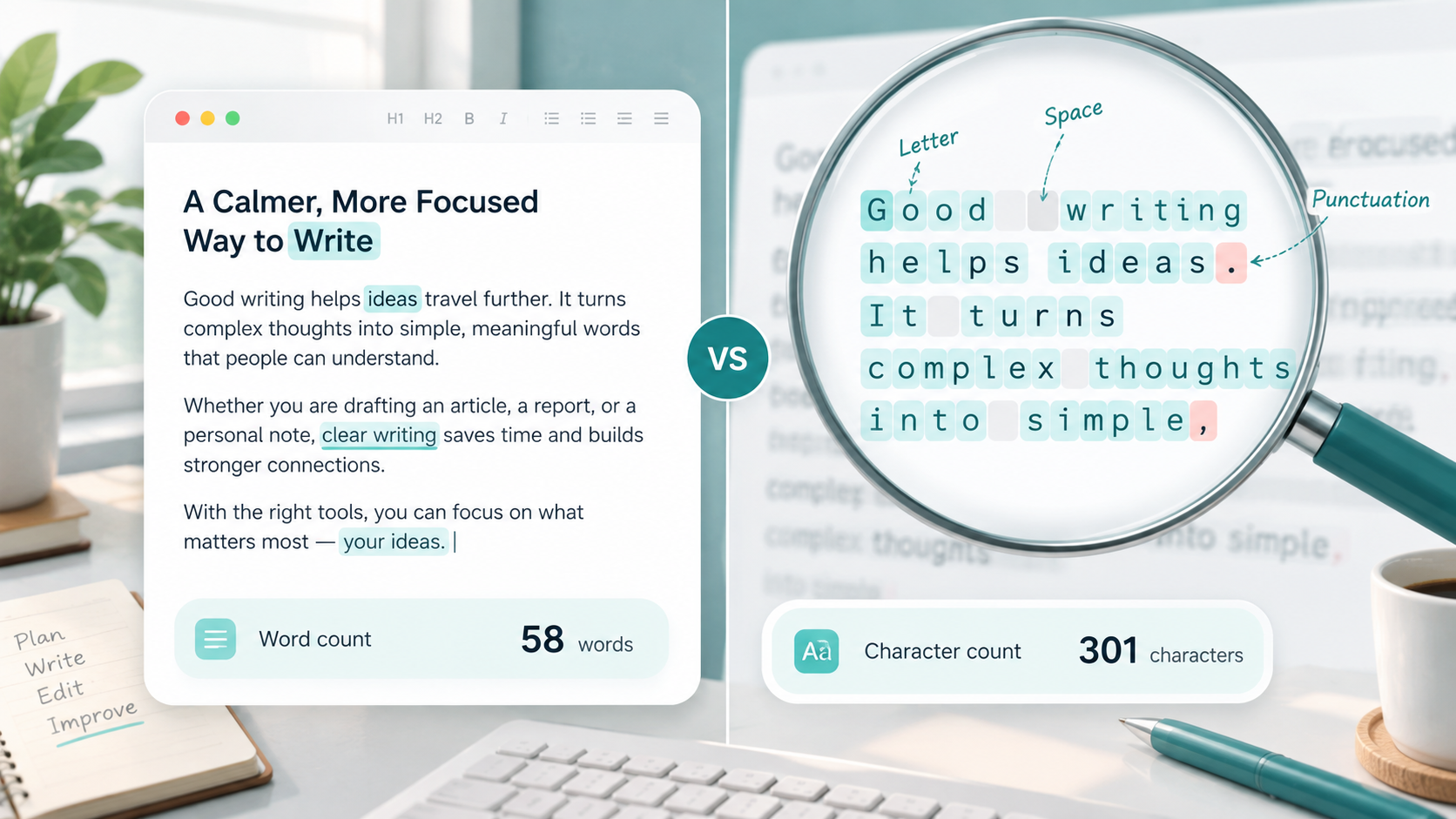
You finish writing a paragraph, paste it into a text counter, and suddenly you see several different numbers: 126 words, 742 characters, and perhaps another total for characters without spaces.
Which number are you actually supposed to care about?
The answer depends on where your text will be used. A teacher may ask for a 1,000-word essay, while an online form might allow only 500 characters. A blogger usually thinks about words when planning an article, but someone writing a page title, short description, social post, or message may need to pay much closer attention to characters.
Understanding word count vs character count makes it easier to follow writing requirements, edit efficiently, and avoid having your text cut off because you measured the wrong thing.
What Is Word Count?
Word count tells you how many separate words appear in a piece of text.
For example:
Writing takes practice.
This sentence contains three words:
Writing
takes
practice
Word count is especially useful when a writing requirement is based on overall content length rather than individual letters.
A 1,500-word article, for example, does not mean that every sentence must have a particular length. It simply means the complete article should contain approximately that number of words.
Different tools may handle unusual text slightly differently, especially text containing hyphenated terms, URLs, numbers, or special formatting. For normal writing, however, word count gives you a practical measurement of how much content you have written.
What Is Character Count?
Character count measures the individual characters that make up your text.
Characters can include:
Letters
Numbers
Punctuation marks
Symbols
Spaces
Consider this short sentence:
Write today.
It contains two words, but many more individual characters because every letter and the punctuation mark can be counted separately.
Some counters also provide two character totals:
Characters with spaces includes the spaces between words.
Characters without spaces ignores those spaces while still counting letters, numbers, punctuation, and other supported characters.
This distinction becomes important when a website, form, platform, or application gives you a specific character limit.
Word Count vs Character Count: The Main Difference
The simplest difference is this:
Word count measures words. Character count measures the individual elements used to create those words and sentences.
Take this example:
ToolNest helps writers edit faster.
The sentence contains 5 words:
ToolNest
helps
writers
edit
faster
Now look at the same sentence as characters.
Each letter counts as a character. The spaces between the words may also count, and the period at the end counts as punctuation.
That means the character total is much higher than the word total.
Spaces are particularly important because some systems specify whether their limit includes them. A form that allows 100 characters including spaces gives you slightly less room than one that counts only non-space characters.
This is why you should never assume that a 100-character limit means anything close to 100 words. They are completely different measurements.
When Word Count Matters
Word count is usually important when the goal is to control the overall depth or length of a piece of writing.
Blog Articles
Bloggers often use target word ranges to plan how thoroughly a topic should be covered.
The goal should not be to reach an arbitrary number at any cost. A useful 900-word article is better than a repetitive 1,500-word article filled with unnecessary sentences.
Word count is best treated as a planning guide.
School Assignments
Essays, reports, and assignments commonly include minimum or maximum word counts.
A requirement such as 800–1,000 words helps students understand the expected level of detail.
Guest Posts
Websites accepting guest contributions may set word limits so submitted articles fit their editorial format.
Checking the total before submitting can save time for both the writer and editor.
Website Content
About pages, service pages, guides, and other website content may be planned around approximate word ranges.
Word count can help writers see whether a page is too thin or unnecessarily long, although usefulness should always matter more than hitting a specific number.
Content Briefs
Editors and content managers often include suggested article lengths in writing briefs.
A target such as 1,200–1,500 words gives the writer a general idea of how much detail is expected.
Freelance Writing Projects
Freelance projects are frequently priced or scoped using word count.
If a project calls for five 1,000-word articles, both the writer and client have a simple way to understand the approximate size of the work.
If you want a deeper explanation of checking article length, see Use Word Counter.
When Character Count Matters
Character count becomes more important when you are working within limited digital spaces.
Meta Titles
Page titles used for search results need to remain clear and concise. While search engines do not work according to one guaranteed character limit in every situation, monitoring title length helps writers avoid unnecessarily long titles.
Meta Descriptions
Meta descriptions also benefit from careful length management.
Character count makes it easier to keep the description concise while still explaining what a page offers.
Social Media Posts
Social platforms can apply limits to posts, profile fields, bios, captions, usernames, and other text areas.
When the platform gives you a character limit, counting words alone will not tell you whether the text fits.
SMS Messages
Text messages may be affected by character length. Longer messages can sometimes be divided into multiple message segments depending on the messaging system and characters used.
Online Forms
Contact forms, application forms, support forms, and profile fields may restrict how many characters you can enter.
If a field allows 250 characters, you need a character count rather than a word count.
Usernames
Usernames usually have strict minimum and maximum character requirements.
Spaces may also be restricted completely.
Product Titles
Online stores and marketplaces often work best with concise product names.
Character count can help you shorten a title without removing essential product information.
Short Descriptions
Short descriptions used in directories, profiles, product listings, and cards often need to fit within limited interface space.
Ad Copy
Advertisements usually provide very limited room for headlines and descriptions.
In these situations, every character matters. Removing even a few unnecessary words can make room for a clearer message.
Characters With Spaces vs Characters Without Spaces
One common source of confusion is seeing two different character totals for the same piece of text.
Suppose you write:
Good writing matters.
A character counter may give you one result that includes every space and another that ignores spaces.
Characters With Spaces
This measurement counts the blank spaces between words as characters.
It is often the relevant number when a platform says that spaces are included in its limit.
Characters Without Spaces
This measurement removes spaces from the total but continues counting the actual letters and punctuation.
Neither measurement is automatically better.
You simply need to use the version required by the platform, assignment, form, or project you are working on.
If the instructions only say "maximum 200 characters" without explaining further, check the platform's documentation or use the actual input field to confirm how its limit behaves.
Why Text Length Matters for Writing
Text length is not just about satisfying a counter. It can affect how clearly and effectively your content communicates.
Readability
Long sections of text can become tiring when they contain unnecessary repetition.
Monitoring length can encourage you to break complex ideas into shorter paragraphs and clearer sections.
Clarity
Character limits force writers to decide what information is essential.
This is useful when writing headlines, descriptions, messages, and calls to action.
Platform Limits
A perfectly written sentence is not useful if the platform refuses to accept it because it exceeds the allowed length.
Checking before publishing prevents unnecessary last-minute editing.
Editing
Word and character totals can reveal where content may need attention.
If a short introduction turns into 500 words, it may need trimming. If an article intended to explain a detailed topic is only 250 words long, it may need more useful information.
SEO Planning
Content length can help with planning titles, descriptions, headings, and articles, but there is no universal rule that longer automatically means better.
Search-focused writing should answer the user's question clearly rather than stretching content simply to increase its size.
User Experience
Readers usually appreciate content that gets to the point while still providing enough detail.
Text length should support the reader rather than become a goal by itself.
How to Check Word Count and Character Count Easily
You do not need to count words or characters manually.
A text counter can quickly show how long your writing is while you work.
Free Tool
Word Counter
Count words, characters, sentences, and paragraphs.
You can use the Use Word Counter when checking an article, assignment, description, message, or other piece of text.
Paste or enter your content, then review the available totals. If both word count and character count are shown, choose the measurement that matches your actual requirement.
For example, if your assignment needs 1,200 words, focus on the word total. If a form gives you a 300-character limit, focus on characters instead.
When using any unfamiliar online text tool, avoid pasting confidential client documents, passwords, private records, unpublished business information, or sensitive personal data unless you understand how that service handles your information.
Common Mistakes When Comparing Words and Characters
Thinking Words and Characters Are the Same
A sentence containing 20 words will contain far more than 20 characters.
Always check which measurement is actually required.
Ignoring Spaces
Spaces may count toward a character limit.
If you are close to the maximum allowed length, this can make the difference between text being accepted or rejected.
Forgetting Punctuation
Periods, commas, question marks, quotation marks, and other symbols may contribute to the character total.
Using Word Count When a Form Requires Character Count
This mistake is especially common with profile descriptions and application forms.
A 100-word paragraph can easily exceed a 100-character field.
Adding Filler Just to Increase Word Count
More words do not automatically make writing more useful.
If you are under a suggested word count, look for missing explanations, examples, steps, or useful context instead of repeating the same idea.
Cutting Useful Text Only to Meet a Number
The opposite problem also happens.
Writers sometimes remove helpful information simply because they think content must stay below an arbitrary length.
Unless a strict limit exists, prioritize usefulness, clarity, and relevance.
Simple Tips for Managing Text Length
Start by identifying the actual requirement. Determine whether you are dealing with words, characters, characters with spaces, or characters without spaces.
Plan longer pieces before writing. A simple outline can prevent one section from becoming much longer than everything else.
Write naturally first when possible. Constantly checking the counter while drafting can interrupt your flow.
Review the length during editing. This is usually the best time to remove repetition, shorten awkward sentences, or expand incomplete explanations.
When trimming text, remove repeated ideas before removing useful information.
When expanding content, add examples, clarification, practical steps, or missing context instead of filler.
For strict character limits, rewrite entire phrases instead of deleting random words. A shorter sentence often sounds much better than a long sentence with important words removed.
Finally, check your text one more time before publishing or submitting it. Small edits made at the end can change both word and character totals.
FAQs
Is word count the same as character count?
No. Word count measures the number of words in text, while character count measures individual letters, numbers, punctuation marks, symbols, and sometimes spaces.
Do spaces count as characters?
They can. Many character counters provide both a total with spaces and a total without spaces. Which one matters depends on the requirements of the platform or project.
Does punctuation count as a character?
In most character-counting systems, punctuation marks such as periods, commas, colons, and question marks count as characters.
Why is my character count much higher than my word count?
Because every word contains multiple letters, and character totals may also include spaces and punctuation. A sentence with only ten words can therefore contain dozens of characters.
Should I use word count or character count for an article?
Word count is generally more useful for measuring overall article length. Character count becomes useful for elements such as titles, descriptions, and other areas with limited space.
Which count should I use for an online form?
Use whatever measurement the form specifies. If it says "500 characters maximum," monitor character count rather than word count.
Are online word counters always exactly the same?
Not necessarily. Different tools may handle hyphenated words, special symbols, URLs, line breaks, or unusual formatting differently. Small differences are possible, especially with complex text.
Does longer content perform better?
Not automatically. Length should match the topic and the reader's needs. Clear, complete, useful writing is more important than adding words simply to make an article longer.
Final Thoughts
Word count and character count both measure text, but they answer different questions.
Word count helps you understand the overall amount of writing, which makes it useful for articles, essays, assignments, briefs, and writing projects. Character count focuses on the individual elements inside the text, making it especially useful for forms, titles, descriptions, social posts, messages, usernames, and other limited spaces.
The important part is not watching every number constantly. It is knowing which number matters for the task in front of you.
Once you understand that difference, managing text length becomes much simpler—and you can spend more time improving the writing itself instead of worrying about the counter.